For every business and every role

Claude training built around your week.

AI adoption that sticks. No one left behind.

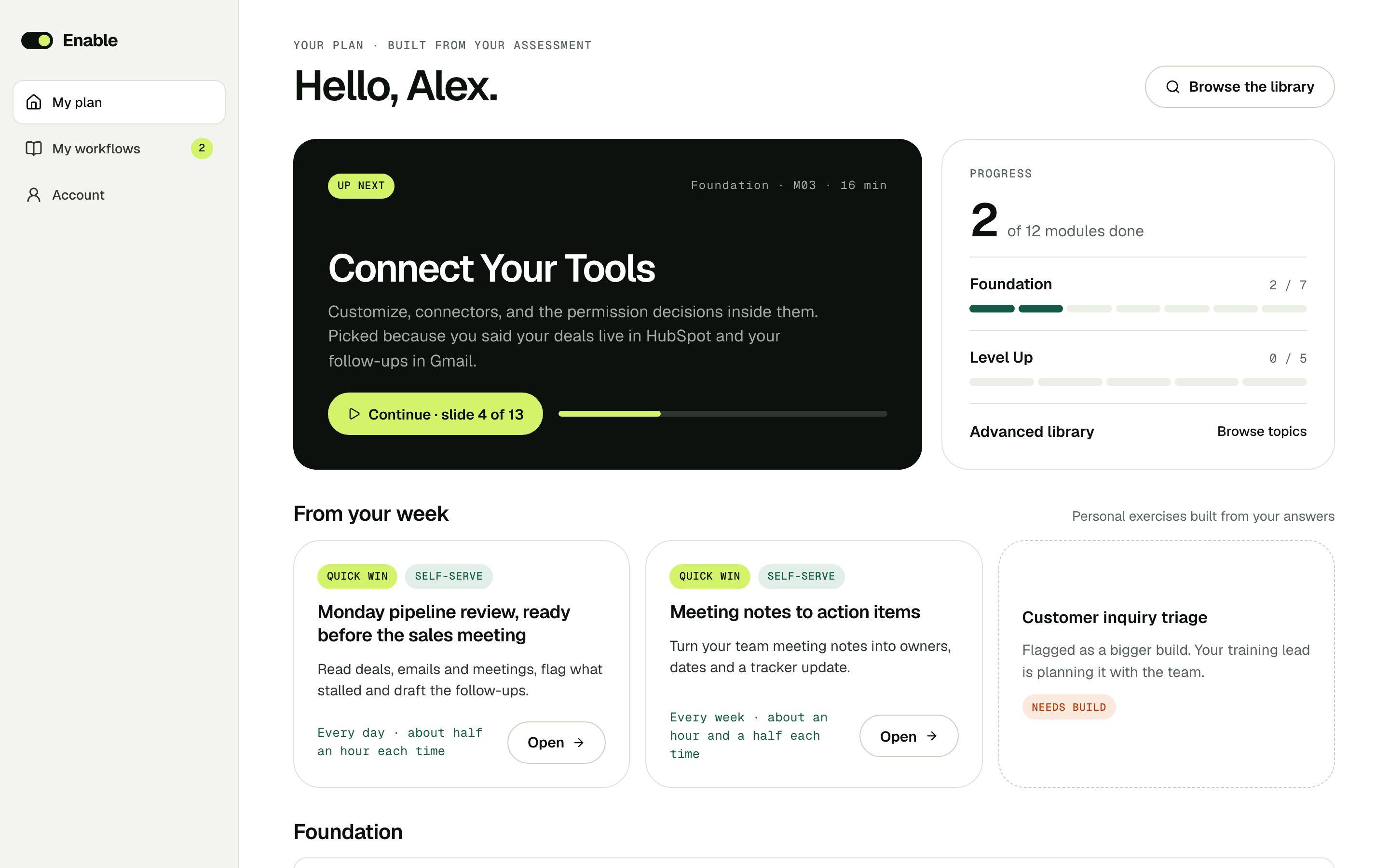
Fifteen minutes of spoken onboarding uncovers the processes worth transforming. Everyone then learns Claude on their own work, with an automation playbook for each opportunity.

Free · about fifteen minutes · English or French

Who it’s for

Any business. Any role. Built around the work people actually do.

Onboarding listens to each person’s own week, so it fits whatever your business does. Four examples of the opportunities it uncovers:

DanaClaims adjuster, regional insurer
Half my week is retyping what people already told me on the phone.
Time found in a week9.5 h
Dana’s opportunitiesExample
Claim call notes written into the claim fileQuick winSelf-serve4 h/wk
Status updates to policyholders drafted from claim notesQuick winSelf-serve3 h/wk
Renewal reminders prepared across the book of businessNice-to-haveNeeds support2.5 h/wk
Each one comes with a playbook and a lesson written for this role.Find yours

How it works

Talk for fifteen minutes. Get a plan nobody else has.

01
Step 01

Onboard by talking about your week

Fifteen minutes, mostly spoken, on your phone or laptop. It asks where your time goes and uncovers the processes worth transforming. No grades, no scores.

  • About fifteen minutes, in English or French
  • Your audio is deleted once the transcript is saved
Start onboarding
02
Step 02

Learn on your own work

Every lesson is rewritten around what you told it: your role, the tools you named, the tasks you repeat. You practice in the AI tools you already have.

  • Three levels: Foundation, Level up, Advanced
  • Every exercise uses your own tools and tasks
03
Step 03

Transform how the work gets done

Each opportunity comes with a playbook: the setup steps, a detailed starter prompt for Claude, the tools to connect and the guardrails. Build it on your own, or with support.

  • Every run is logged
  • Nothing goes out without a person approving it
Get my free playbook

The curriculum

Three levels, built around each person’s work.

Every module keeps the same structure for everyone, and its exercises are rewritten around the work onboarding uncovered for that person. When Claude gains a capability, the modules that use it are refreshed.

Start with fifteen minutes of onboarding

Foundation

9 modules

For people new to AI, or new to using it for real work.

Most people start here
  1. 01Start here
  2. 02How to think with AI
  3. 03The desktop app, end to end
  4. 04Connect your toolsUp next
  5. 05Working in Google and Microsoft apps
  6. 06Claude in meetingsNew
  7. 07Skills and plug-ins
  8. 08Projects, your home base
  9. 09Hygiene, tips and tricks

Level up

5 modules + 1 optional

From asking questions to handing over whole workflows.

Ready to hand over work
  1. 01Designing your workflow
  2. 02Cowork: Claude does the workUp next
  3. 03Automate it
  4. 04Write your own skill
  5. 05Ship one workflow
  6. 06Design like a proOptional

Advanced library

10 topics

Topics to pick from once the basics are second nature.

Already building
  1. 01Your full AI setup
  2. 02Prompting as partnership
  3. 03Cowork power patterns
  4. 04Multi-step plans for long workflows
  5. 05Designing a project for a team
  6. 06Build and tune a managed agent
  7. 07Custom skills at scale
  8. 08Claude Code
  9. 09Optimize your context window
  10. 10Self-debugging your skills
Built on ClaudeEnable teaches Claude, in the apps your people already use.Everyone taking part needs their own paid Claude plan. It isn’t included in Enable.
On your ownProMax
For a companyTeamEnterprise

For teams and businesses

You rolled out Claude.Now everyone builds with it.

Most people never get past the chat box. Enable onboards each person, uncovers the repetitive work in their week and shows them how to hand it to agents and automations. Everyone brings ideas, and the best ones become your roadmap.

Cassandra Girard · founderBook a free program consultationA short call with me to scope your program. About me
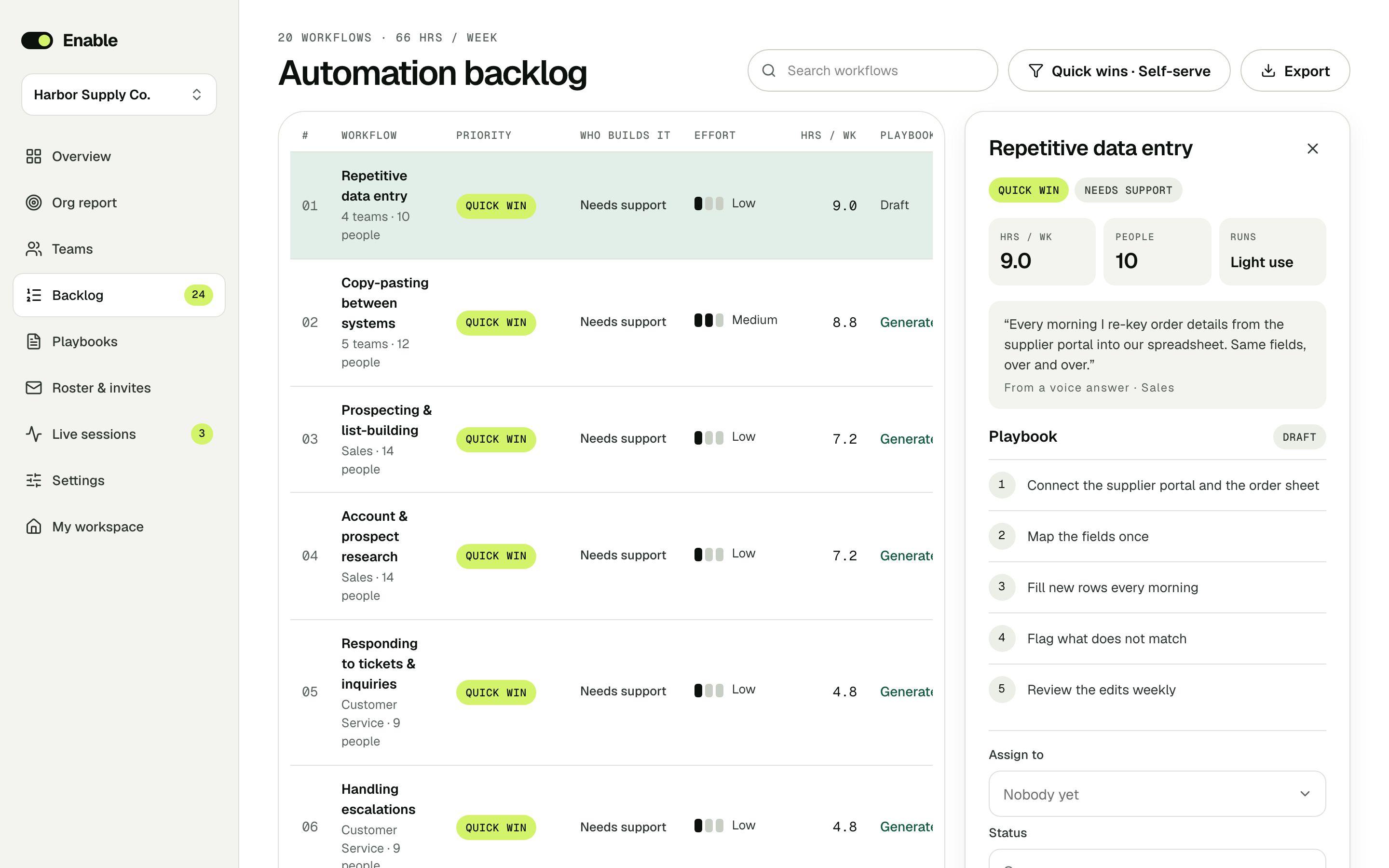
For the businessEvery idea, from every personThe automation backlog: what people do by hand, the hours it takes, who builds it and a playbook to get there.
Enable’s automation backlog: workflows found in people’s voice answers, each with its priority, who builds it, its effort, the hours it takes each week and a step-by-step playbook
For each personTheir own planLessons written around their tools and tasks, and the automations from their week to build first.
A person’s plan in Enable: the next lesson, picked from their answers, and the automations from their week marked quick win or needs build

Everyone contributes

Ideas come from the people who do the work. Each person spots what is worth automating in their own week.

Beyond the chat box

People learn to hand whole tasks to Claude: connectors, agents and automations, not only questions.

A roadmap from the ground up

Every idea logged with the hours it returns, its owner and a step-by-step playbook to build it.

Always current

When Claude gains a new capability, the training refreshes with it. No one retrains from scratch.

No one left behind

From first-time users to people already building agents, everyone learns on their own work.

Self-service or managed

Run it yourself from the admin, or with me from kickoff to rollout, with hands-on help for the bigger builds.

Pricing

Start free. Go further on your own. Bring your business.

Free

$0Just for you, to see what’s in your week.
  • Fifteen minutes on how you work
  • Your ranked list of opportunities
  • Your first playbook

Personalized training

$139per personSelf-paced, with 90 days of access.
  • Everything in Free
  • Personalized exercises in every module
  • All your playbooks
  • Lessons refresh as Claude adds capabilities

Training + coaching

Start here
$279per personThe full training, plus a live hour with a coach.
  • Everything in personalized training
  • One live 60-minute coaching hour
  • Coaching starts from your plan, not from scratch
More coaching: $165 a session, or $750 for five.

Teams and businesses

Per programSelf-service or managed, scoped with you.
  • Everyone onboarded and trained on their own work
  • Org report, roadmap and ranked backlog
  • A follow-up check that shows what changed
  • Implementation support as needed
Scoped with Cassandra Girard, founder

Prices in US dollars. Every plan needs a paid Claude subscription for each person taking part.

Find the hours hiding in your week.

What’s in a playbook · an example
Big betNeeds support

Public tender responses, drafted from your past bids

Bid manager · facilities services, 120 peopleEvery new tender · about 90 min to set up · 8 steps · about 12 hours back per bid

Set it up

  1. 01In Claude, turn on the Outlook, SharePoint, Excel and Teams connectors. Keep SharePoint read-only: the bid library is a source, never a target.
  2. 02Create a Claude project called Bid library: your last 20 bids with their scores, certifications, insurance certificates, CVs and case studies, with project instructions on what each folder holds.
  3. 03Write a tender-compliance skill: pull every mandatory requirement, deadline, page limit, format and scoring criterion out of a tender pack into a compliance matrix, and flag anything you cannot meet.
  4. 04Write a bid-voice skill: how your company answers a scored question, the proof it always cites, and the claims it never makes.
  5. 05Dry-run it in Cowork on a tender you already answered, and compare the draft and the matrix with what you submitted and how it scored. Fix the skills until they match.
  6. 06Set Cowork to watch the bids inbox: when a tender notice arrives, it reads the pack, builds the compliance matrix in Excel and writes a go/no-go note with the risks (deadline, insurance minimums, missing certifications).
  7. 07On go, it drafts each scored answer from the library into a Word draft in SharePoint / Bids in progress, citing the past bid each paragraph comes from, and fills the pricing sheet from the rate card, marked for review.
  8. 08It posts the go/no-go note, the matrix and the draft in the bids channel in Teams. A person reviews, prices and submits. Claude never submits anything.

Automation starter prompt

Paste it into Claude. Where your plan includes Cowork, it can run the whole workflow.
I’m the bid manager at a 120-person facilities services company. We answer about four public tenders a month, and each one takes me roughly 15 hours: reading the pack, checking we comply, finding the right paragraphs in old bids and rewriting them. Help me turn it into a Cowork workflow.

When a tender notice lands in the bids inbox in Outlook:
1. Download the tender pack and read every document. Use my tender-compliance skill to build a compliance matrix in Excel: each mandatory requirement, where it is in the pack, our evidence, and a status (met, partly met, not met).
2. Write a one-page go/no-go note: deadline, contract value, scoring weights, and every requirement we cannot meet today (insurance level, certifications, references), with where you found it.
3. Stop and wait for my go in Teams.
4. On go, draft an answer to each scored question with my bid-voice skill, using only the Bid library project. After each paragraph, cite the past bid and section it comes from. Mark anything you had to assume.
5. Fill the pricing sheet from the rate card in Excel and highlight every line you could not price.
6. Save the draft, matrix and pricing in SharePoint / Bids in progress / [tender name], and post the three links in the bids channel.

Rules for every run:
- Keep a run log: what you read, what you flagged and why, what you wrote where.
- Never invent a certification, figure or reference. If the library has no proof, say so in the matrix.
- Nothing is submitted, signed or sent to the buyer. A person does that.

Before you build anything, ask me the questions that would most change this design. Then draft the workflow step by step, list your assumptions, and dry-run it on the tender pack in SharePoint / Past bids / Municipal cleaning 2025, where you can compare with what we submitted.

What you get · For each tender: a compliance matrix and a go/no-go note within the hour, then a cited draft of every scored answer and a pre-filled pricing sheet in SharePoint, with a run log.

Connect these tools

  • OutlookWatches the bids inbox for tender notices and reads the attached packs.
  • SharePointReads the bid library and saves drafts to Bids in progress. The library stays read-only.
  • ExcelBuilds the compliance matrix and fills the pricing sheet from the rate card.
  • Microsoft TeamsAsks for the go/no-go decision and shares the links with the bid team.

Data flow

  • Trigger: a tender notice arrives in the bids inbox
  • Read: the tender pack, the Bid library project, the rate card
  • Judge: the compliance skill builds the matrix and the go/no-go note; a person decides
  • Write: the cited draft, the matrix and the pricing sheet in SharePoint, with a run log
  • Share: the go/no-go note and the links in the bids channel

Keep in mind

  • Claude never submits, signs or sends anything to a buyer.
  • Every paragraph cites its source bid, so a reviewer can check each claim.
  • Requirements it cannot prove from the library are flagged, never filled in.
  • The bid library stays read-only; nothing in it is changed.

An example. Real playbooks are written from each person’s onboarding: their role, their tools and the work they described.